
How to Start the Planet Express Affiliate Program and How Commissions Work

The package forwarding service Planet Express runs its own affiliate program. If you write about personal imports, overseas online shopping, or goods and gadgets from abroad on a blog, YouTube or social media, you can recommend Planet Express and earn a commission when the customers you refer ship with us.
This article explains how commissions work and how to get started in the new member area.
How commissions work
When a customer who signed up through your referral link ships their first package, you earn a commission for that customer. There is no upper limit. As more of your referred customers ship, the commission per customer goes up.
| Referred customers who shipped | Commission per customer |
|---|---|
| 0-99 | $5 |
| 100-199 | $6 |
| 200-499 | $7 |
| 500+ | $10 |
- Who counts: customers who sign up within 2 months of clicking your link and ship their first package.
- Getting paid: once you reach the minimum, request a payout to PayPal. The minimum is shown in the member area.
There is also an overview on the affiliate program page.
Getting started
- Sign up free Planet Express sign-up is free. Along with your US and UK warehouse addresses, it gives you the affiliate features.
- Open Affiliate In the member area, open the account menu (your initials at the top right) and choose Affiliate.
- Copy your referral link Copy your personal link under Your Referral Link and add it to your blog or social media.
- Add your website’s domain (optional) If you recommend us from your own site, add its domain under Affiliate Domains. Approved domains show as Approved.
- Track and collect your commissions See your commissions under My Provisions and the customers you referred under Invited Users. Once you reach the minimum, use Request Payout to get paid by PayPal.
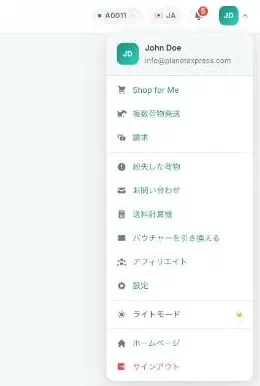
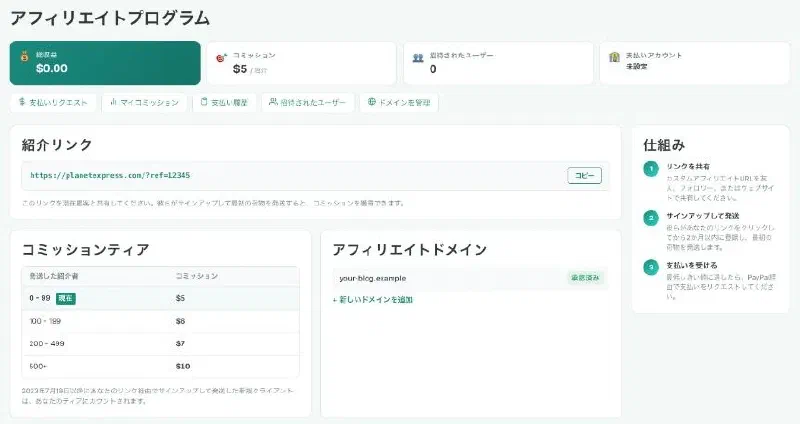
The Affiliate page shows your total earnings, current commission, number of invited users, referral link, commission tiers and registered domains in one place.
Tips for recommending us
- Pick content that fits: guides to buying from overseas stores, store reviews and comparisons of forwarding services suit readers who want to import from the US or UK.
- Use current information: fees, warehouses and shipping methods can change. Check the pricing, warehouses and shipping pages.
- Label ads as ads: in Japan, advertising that hides the fact that it is an ad (stealth marketing) is regulated under the Act against Unjustifiable Premiums and Misleading Representations. Mark posts with affiliate links as an ad or PR.
Support
Planet Express has Japanese staff based in Japan who answer in Japanese (ja@planetexpress.com ). If you are writing a comparison and need current information, email us. See Japanese support for details.